
Interval Operations#
Interval objects can be manipulated using standard set-arithmetic
operations such as union, intersection, and difference, along with a few other
useful operations like dilation and coalescing.
First, let’s create some simple intervals:
>>> from torch_brain.data import Interval

>>> # first interval is over [1, 8) and [12, 18)
>>> interval1 = Interval(start=[1., 12.], end=[8., 18.])

>>> # second interval over [2, 5), [7, 10), and [14, 17)
>>> interval2 = Interval(start=[2., 7., 14.], end=[5., 10., 17.])
Intersection#
The intersection operation (&) creates a new Interval
containing only the overlapping time periods between two objects.
>>> intersection = interval1 & interval2
>>> intersection.start, intersection.end
(array([ 2.,  7., 14.]), array([ 5.,  8., 17.]))
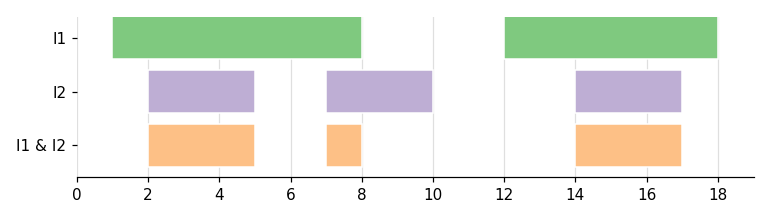
Visualization of thet intersection operation#
Union#
The union operation (|) combines the two intervals in a set-union fashion,
merging any overlapping or touching periods.
>>> union = interval1 | interval2
>>> union.start, union.end
(array([ 1., 12.]), array([10., 18.]))
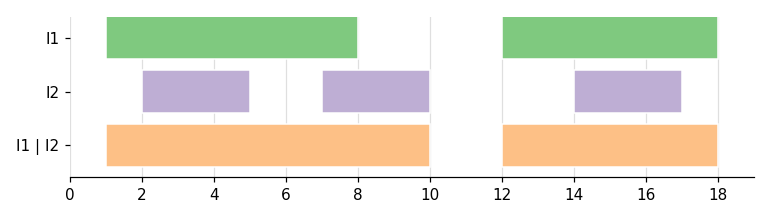
Visualization of the union operation#
Difference#
The difference operation returns a new Interval
containing time periods that are in the first interval but not in the second
interval.
>>> difference = interval1.difference(interval2)
>>> difference.start, difference.end
(array([ 1.,  5., 12., 17.]), array([ 2.,  7., 14., 18.]))
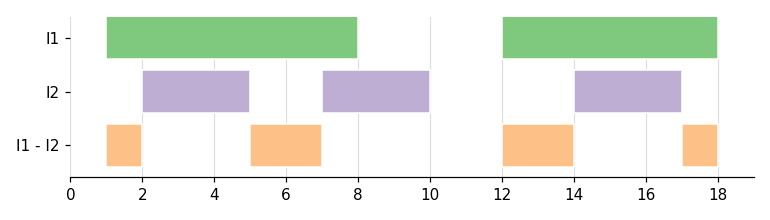
Visualization of the difference operation#
Dilation#
The dilate method expands each interval by a specified amount
on both sides.
>>> # Create three intervals [1., 5.), [10., 13.5), and [14., 18.)
>>> interval = Interval(start=[1.0, 10.0, 14.0], end=[5.0, 13.5, 18.])

>>> # Dilate by 0.5 on each side
>>> dilated = interval.dilate(0.5)
>>> dilated.start, dilated.end
(array([ 0.5 ,  9.5 , 13.75]), array([ 5.5 , 13.75, 18.5 ]))
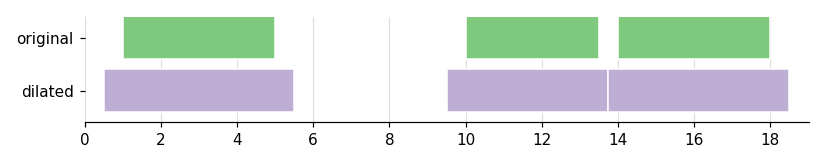
Visualization of the dilation operation#
The dilation operation is particularly useful when you need to:
Create buffer periods around events
Account for uncertainty in interval boundaries
Merge intervals that are close together
Coalescing#
The coalesce method merges overlapping or touching intervals
into single continuous intervals. This is useful for simplifying interval sets
and removing gaps below a certain threshold.
>>> # Create four intervals [1, 6), [6.1, 11), [11.3, 14.5), and [14.5, 17.8)
>>> interval = Interval(
...     start=[1., 6.1, 11.3, 14.5],
...     end=[6., 11., 14.5, 17.8],
... )

>>> # Coalesce intervals that are within 0.2 of each other
>>> coalesced = interval.coalesce(0.2)
>>> coalesced.start, coalesced.end
(array([ 1. , 11.3]), array([11. , 17.8]))
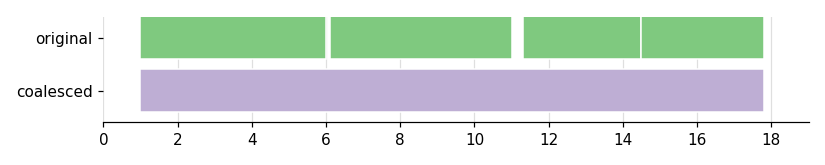
Visualization of the coalesce operation#
The coalesce operation is useful for:
Cleaning up noisy interval data
Merging intervals that are effectively continuous
Simplifying interval representations
Note
There are multiple edge cases that can occur when performing interval operations. For more details, see the Edge Cases section below.
Introspection#
We also provide some introspection methods to check whether the periods in an
Interval are disjoint (non-overlapping) and sorted (in increasing
order of start time).
Here, the two periods [0, 1.1) and [1, 2) overlap, so the interval is
not disjoint, but its start times are still in increasing order:
>>> # Create two intervals [1., 1.1), and [1., 2.)
>>> interval = Interval(start=[0., 1.], end=[1.1, 2.0])
>>> interval.is_disjoint(), interval.is_sorted()
(False, True)
By contrast, these periods don’t overlap and are already ordered, so both
checks return True:
>>> # Create two intervals [0., 1.), and [3., 4.)
>>> interval = Interval(start=[0., 3.], end=[1., 4.])
>>> interval.is_disjoint(), interval.is_sorted()
(True, True)
The set operations above (intersection, union, and difference) require their
inputs to be disjoint and sorted, and will raise a ValueError otherwise, so
these methods are handy for validating an Interval object.
Edge Cases#
Interval operations also handle a number of edge cases gracefully. Here we walk through a few of them.
Adjacent Intervals#
When two intervals are exactly adjacent (the end of one equals the start of the next), the union operation merges them into a single interval:
>>> # Two adjacent intervals [1, 2) and [2, 3)
>>> adjacent = Interval(start=[1., 2.], end=[2., 3.])

>>> # Union merges them into [1, 3)
>>> merged = adjacent | adjacent
>>> merged.start, merged.end
(array([1.]), array([3.]))
Point Intervals#
Intervals where the start equals the end (i.e. zero-duration “point” intervals) are handled gracefully:
>>> # A point interval at t = 2
>>> point = Interval(start=[2.], end=[2.])

>>> # Intersecting with an interval that contains that point
>>> other = Interval(start=[1.], end=[3.])
>>> intersection = point & other
>>> intersection.start, intersection.end
(array([2.]), array([2.]))
Empty Intervals#
Operations involving an empty interval (one with no time periods) return the results you’d expect:
>>> # An empty interval
>>> empty = Interval(start=[], end=[])
>>> some_interval = Interval(start=[1.], end=[2.])

>>> # Intersection with an empty interval is empty
>>> len(empty & some_interval)
0

>>> # Union with an empty interval returns the non-empty interval
>>> union = empty | some_interval
>>> union.start, union.end
(array([1.]), array([2.]))
Non-disjoint or Unsorted Inputs#
As mentioned above, the set operations require their inputs to be disjoint and
sorted. If they aren’t, the operation raises a ValueError:
>>> # [1, 3) and [2, 4) overlap, so this interval is not disjoint
>>> overlapping = Interval(start=[1., 2.], end=[3., 4.])
>>> overlapping & some_interval
Traceback (most recent call last):
    ...
ValueError: left Interval object must be disjoint.

>>> # Coalesce into a disjoint interval first, then the operation works
>>> fixed = overlapping | overlapping
>>> result = fixed & some_interval
>>> result.start, result.end
(array([1.]), array([2.]))
These edge cases are worth keeping in mind when working with intervals, especially in data-processing pipelines where unexpected interval patterns can arise.